ads


"Today, at its second annual upfront to advertisers, [Netflix] announced that it has created interactive mid-roll ads and pause ads that incorporate generative AI."
#news #technology #TechNews #netflix #AI #GenerativeAI #ads #advertising
"The original video showing off Google's Gemini offerings in Workspace was posted five days ago and showed the AI generating a response for a small-business owner in Wisconsin. In the response, Gemini claims Gouda accounts for "50 to 60% of the world's cheese consumption.
The edited ad now shows a Gemini response that says Gouda "is one of the most popular cheeses in the world."
https://www.businessinsider.com/google-super-bowl-ad-gemini-ai-gouda-cheese-2025-2
Archived link: https://archive.is/2cX3i

Now even more arguments to other people to make them switch messenger apps.
https://www.nytimes.com/2025/06/16/technology/whatsapp-ads.html

www.linkedin.com##div[componentkey="newsAndGamesCard"]
#uBlockOrigin #LinkedIn #cruft #clutter #ads
This post is not an invitation to scold me for using LinkedIn or Microsoft products, nor to suggest I leave it or find alternatives.

I had a crash that took down Firefox, so when I restarted it it was the newest version (an update I'd installed, but hadn't restarted after).
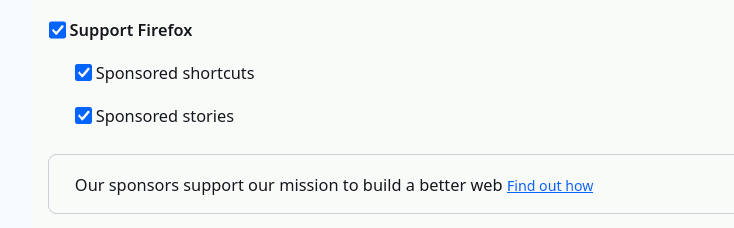
I just went looking through the settings pages, which is a habit I've unfortunately had to get into because #Firefox and #Mozilla keep adding new anti-user fuckery in their continuing quest to drive users away from the only product they make that anyone gives two shits about.
And lo and behold, *this* is the new fuckery I found. Enabled by default. And it reinforces the need to go *check* for this bullshit every version update.
Firefox, if you had asked me how to cut my already diminishing trust in you to do the right thing by your users to near zero, I wouldn't have even dreamed this batshittery up. It's so much worse than I would have suggested. I have *all* the crap turned off - silently adding new crap and silently defaulting it to on is 1995-era Microsoft-screwing-the-users.
You feel you need to add this shit? Fine. But show me a dialog asking me whether I want it on or not when that version first starts. Don't turn it on behind my back and HOPE I DON'T NOTICE.
#fuckery #TwoShits #batshittery #abuse #DarkPattern #user #BehindYourBack #Enabled #EnabledByDefault #permission #AskPermission #sponsored #ads #privacy #version #update #bullshit

The ad invasion is about to get a lot worse… - https://www.youtube.com/watch?v=_YC_qOM_o2I
Osobně nějaký vyšší množství reklam nepozoruju. Ale to je hlavně kvůli tomu, že proti tomu aktivně bojuju. Pár tipů:
- Vyserte se na komerční sociální sítě nebo přítomnost na nich minimalizujte. To zrovna tady asi nemusím rozebírat. 😄
- Nainstalujte si adblock do prohlížeče. Nejlíp funguje uBlock Origin (https://addons.mozilla.org/en-US/firefox/addon/ublock-origin/). K tomu budete potřebovat Firefox. Jasně, má problémy, ale lepší alternativa aktuálně prostě neexistuje. Navíc podporuje rozšíření i na Androidu. Jiný (ale horší) možnosti:
- Fork Firefoxu, ale tam většinou přicházíte o včasný security updaty. Nedoporučuju.
- Fork Chromia se zabudovaným adblockem. Tady můžu s čistým svědomím doporučit asi jen Vivaldi. Ale ze zkušenosti to nefunguje tak dobře jako uBlock Origin.
- Jinej fork Chromia, kam si nainstalujete uBlock Origin Lite. Ale zase, je to okleštěná verze (kvůli nepodpoře Manifestu V2), nefunguje tak dobře.
- Nainstalujte si na Android DSN filtr. Možnosti jsou (od nejjednodušší):
- Využijte nastavení Private DNS a hoďte si tam https://libredns.gr (podrobnej návod najdete v sekci DNS over TLS -> Android) nebo https://www.joindns4.eu/for-public. Výhoda je, že nemusíte nic instalovat a nezabere vám to VPN slot, ale spoléháte na třetí stranu.
- personalDNSfilter (https://play.google.com/store/apps/details?id=dnsfilter.android), asi nejjednodušší lokální filtrace.
- Invizible Pro (https://f-droid.org/packages/pan.alexander.tordnscrypt.stable/), podporuje navíc DNSCrypt a Tor, ale nastavení není pro slabý povahy. 😄
- Pokud to je aspoň trochu možný, používejte web místo appky. Reklamy a trackery v appkách se blokujou mnohem hůř a někdy to ani nejde.
- Nepoužívejte Google. Osobně můžu doporučit https://www.startpage.com (má kontextový reklamy, ale daj se vypnout přes adblock) nebo https://searxng.cz (provozuje @oscloud).
- Ideálně se vyhněte chytrejm hovadinám, který nefungujou bez appky. Jasně, u hodinek apod. je to složitější, ale fakt nepotřebujete lednici nebo pračku s Wi-Fi.